In brief
- The Noise analysis feature in Forma Site Design works in both Rapid (instant estimate) and Detailed (simulation) modes.
- Calculations are based on the CNOSSOS-EU methodology developed by the European Commission.
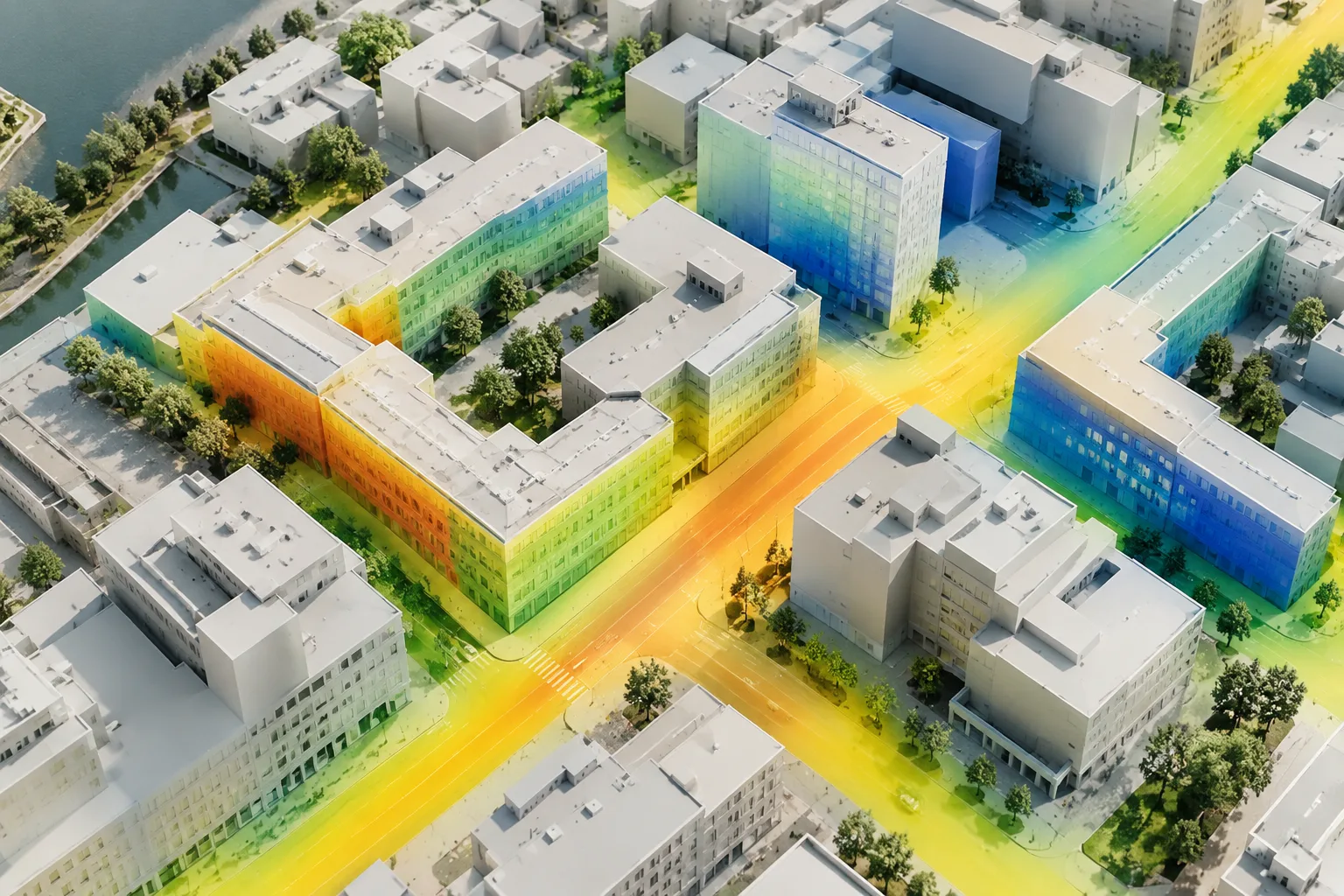
- The analysis breaks results down statistically across ground, facade and roof surfaces, visualized with a color map.
- Geometry from Rhino and Revit can be imported directly into Forma for analysis in the same environment.
- Forma Site Design subscriptions start at $59/month and include a 30-day free trial.
Autodesk Forma Site Design offers an environment where traffic and rail noise can be evaluated while the massing model is still taking shape. According to the product page, this analysis works in two stages: first, the AI-based Rapid noise analysis provides instant estimates, then the Detailed noise analysis verifies these estimates through simulation. This guide, based on the feature descriptions in Forma's official documentation, explains the general flow of noise analysis and where it fits into the architectural process; since the documentation presents feature descriptions rather than exact menu steps, the flow below should be read as a general usage framework.
Why is early-stage noise analysis necessary?
Being a noise expert isn't an architect's job, but according to Autodesk's blog post, architects are now expected to understand noise levels and their effects at an early stage. The reason is simple: making changes while the design is still digital is far cheaper and faster than correcting it after construction. Traditionally, noise consultants only join a project at a later stage when preparing a detailed report, which makes the architect the first person to notice noise issues on site.
Analysis workflow in Forma
Creating site context — Order terrain, building, and road data for your region through the Forma Data Marketplace; the data is automatically added to the project, preparing the site context this way.
Importing geometry — If you have an existing Revit or Rhino model, bring the geometry directly into Forma using Rhino to Forma or the Revit integration; model import in IFC/OBJ format is also supported.
Running Rapid noise analysis — Select the fast mode among the environmental analysis tools. This mode generates instant estimates based on machine learning and shows the effect of design changes on noise in real time.
Verifying with Detailed noise analysis — As the massing becomes clearer, move on to the detailed analysis. This analysis connects to a road and traffic database, or you can add your own traffic data; results are presented with statistical breakdowns across ground, facade, and roof surfaces.
Comparing scenarios — Use the Visual compare feature to view, for example, intersecting streets with and without traffic side by side, understanding the impact of different road scenarios.
The documentation doesn't show the exact menu hierarchy for these steps at screenshot level; therefore, the sequence above reflects the functional flow of the features, not the precise click path.
Difference between Rapid and Detailed analysis
| Analysis type | Speed | Purpose |
|---|---|---|
| Rapid noise analysis | Instant (real-time) | Guiding design decisions with AI-based estimates |
| Detailed noise analysis | Requires simulation time | Verifying results with traffic data, laying groundwork for official assessment |
Both analyses display results on a red-green color scale; red represents problematic conditions, green represents suitable ones. This visual language makes it easier to communicate with stakeholders who lack technical knowledge, such as municipalities or residents.
What does this mean for architecture and interior design workflows?
Noise analysis in Forma allows working on the same massing model without switching to a separate acoustic software, which saves time especially at the early concept stage. Practical benefits for architects include:
Identifying low-cost interventions early, such as shifting an opening toward a courtyard or converting the lowest and noisiest facades from residential to commercial use.
Seeing at the project's outset whether noise barriers, acoustic glass, or facade sound insulation systems are needed.
Avoiding additional software overhead in the existing BIM workflow thanks to direct data exchange with Revit and Rhino.
Since it requires a subscription (Forma Site Design starts at $59/month), licensing cost should be evaluated according to team size; a 30-day free trial is available.
Common mistakes
Relying solely on Rapid analysis and skipping verification with Detailed analysis; official sustainability certifications may require detailed simulation results.
Running the analysis without keeping site context data (roads, traffic) up to date; adding your own traffic data improves the accuracy of results.
Presenting analysis results as a final decision without involving a noise consultant; results in Forma are a tool to start a dialogue with the consultant, not a replacement for one.
Starting analysis without cleaning up geometry imported from Rhino or Revit; if model preparation is lacking, results can be misleading.
Sources
3 sourcesSource texts are not republished; short quotes are marked, everything else is our own summary and commentary.
For offices in Turkey, Forma's noise analysis speeds up early decision-making, especially in dense urban areas; importing a Rhino or Revit model directly and getting results in the same environment without learning separate acoustic software saves time. However, subscription-based pricing and cloud dependency should be evaluated in terms of cost and internet infrastructure for smaller offices.
The biggest risk is relying on the speed of Rapid analysis and skipping detailed verification, or not involving a noise consultant in the process at all. Forma should be considered a preliminary assessment tool that starts communication with the consultant early, not a substitute for the final acoustic report.
Frequently asked questions
What is the difference between Rapid and Detailed noise analysis in Forma?
Rapid noise analysis produces instant estimates using machine learning, while Detailed noise analysis runs a simulation with traffic data to verify the results.
What standard are Forma's noise calculations based on?
Calculations are performed according to the CNOSSOS-EU (Common NOise aSSessment methOdS) methodology developed by the European Commission.
Can I use my Rhino or Revit model for noise analysis in Forma?
Yes, Forma integrates with Rhino and Revit; geometry can be imported directly for analysis within the same environment.