In brief
- Nano Banana 2 is presented as another name for the Gemini 3.1 Flash Image model.
- The model supports generation and editing using text instructions alongside uploaded images.
- Google recommends that more detailed prompts describe elements such as the subject, setting and overall look.
- Nano Banana 2 is available through the Gemini API; Google AI Studio requires a paid API key to use the model.
This guide covers creating prompts for architectural and interior images with Nano Banana 2, requesting edits based on a reference image, and refining results through conversation. Google also introduces the model as Gemini 3.1 Flash Image. It can generate and edit images from text prompts; the Gemini Image page also describes uploading an image, giving text instructions, and then continuing the conversation to refine the result. The examples below adapt these documented approaches to architectural visualization scenarios.
What you’ll learn
A good architectural image prompt should do more than ask for “a modern living room.” Clearly describe the type of space, what should appear in the frame, the character of the materials, and the atmosphere created by the lighting. Gemini Image’s official guidance likewise recommends detailing the subject, setting and overall feel.
In this guide, you’ll see three ways to work: request an interior image from scratch, describe how to transform an uploaded sketch or photo, and refine the first result in a conversation. These are not steps tied to a specific menu path; they are examples of adapting the text and image prompting methods described in the sources to architectural work.
Requirements and usage terms
Google’s product page identifies Nano Banana 2 as Gemini 3.1 Flash Image. The sources show Gemini, Google AI Studio and the Gemini API as options for trying the model and using it for development. According to Google’s developer announcement, the model is available in the Gemini API and Google AI Studio; it also mentions an enterprise option in Vertex AI, as well as support for Google Antigravity and Firebase.
Google’s announcement states that a paid API key is required to use Nano Banana 2 in Google AI Studio. It’s therefore important to check licensing and usage costs before choosing an interface. The sources do not specify local hardware, a particular computer requirement, or a direct plugin connection to architectural software, so this guide treats the model as a separate image generation and editing tool.
Before you begin, have a sketch, reference photo or material sample ready, if you have one. If you don’t want to upload an image, you can describe the scene using text alone. Rather than reducing your prompt to a short subject line, describe the space, composition, material character and lighting conditions together.
Step by step: creating an architectural prompt
1. Describe the scene and framing
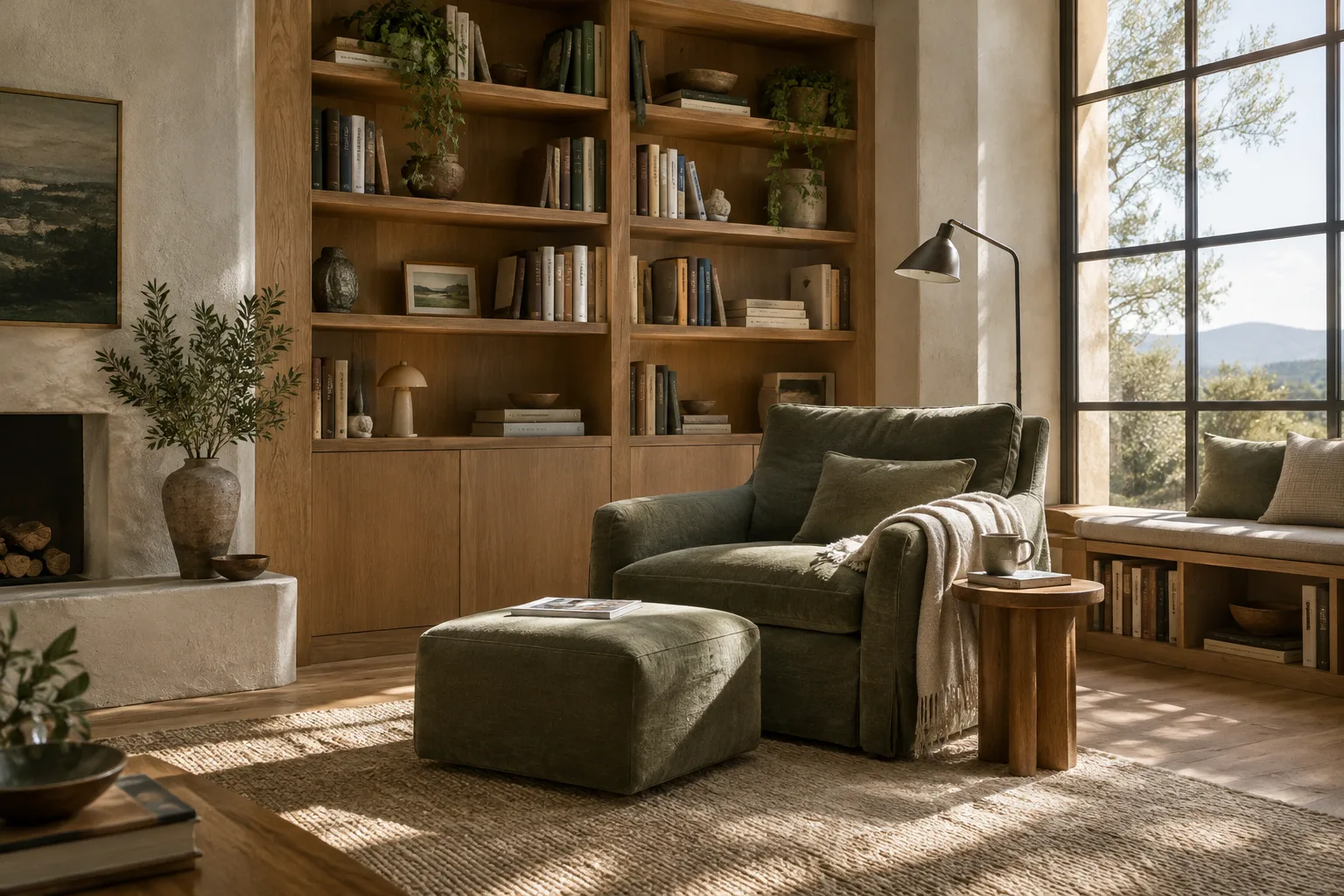
The goal of this first example is to bring the essential elements of an interior image together in a single prompt. Specify the space’s function, what the frame should show, and the image’s overall feel. The text below is an original example created for this guide:
Create an architectural interior visualization of a calm reading corner in a contemporary home. Show a built-in oak bookcase, a low upholstered chair, a small side table and a tall window in one clear wide composition. Use warm natural wood, softly textured off-white walls and a muted green accent. Daylight enters from the window and creates gentle shadows. Keep the furniture arrangement uncluttered and make the room feel quiet, tactile and lived-in.This prompt describes not only the individual objects, but also the framing and atmosphere. If there’s a particular element you want to control, bring it to the foreground—for example, ask for the bookcase to dominate the frame or for the window to remain visible in the composition. There’s no guarantee the model will interpret every detail exactly as intended on the first try; the prompt is there to make your design decisions clearer.
2. Turn an existing image into an editing prompt
The Gemini Image page says that you can upload an image and make complex, detailed edits using text instructions. The second example focuses on using an interior photo as a starting point, preserving the main scene and requesting specific changes:
Use the uploaded interior image as the visual reference. Preserve the room layout, camera viewpoint and major architectural openings. Replace the glossy floor with matte light stone, change the dining chairs to simple dark timber chairs, and add a restrained linear pendant above the table. Keep the existing daylight direction and create a realistic architectural visualization with balanced materials and a calm, neutral atmosphere.Here, the prompt separately identifies which aspects of the uploaded image to preserve and which to change. This distinction matters when working from a sketch or photo: instead of a general instruction such as “make it better,” specify the layout to keep and the elements to change. For instance, if you want to keep the plan arrangement fixed and change only the surfaces or furniture character, say so clearly.
3. Refine the first result through conversation
Google lists refining an image step by step through an ongoing conversation in everyday language among the capabilities of the model family. Choose one or a few priorities for each revision, and also remind the model what should stay the same rather than making many vague requests at once. Example follow-up prompt:
Keep the same room, layout and camera view. Make the timber finish slightly darker, reduce the visual contrast of the wall art, and soften the daylight so the shadows are less pronounced. Do not add new furniture. Preserve the quiet residential mood.This approach can help you develop a design option in a controlled way. Review what changed in the result, then write a new revision prompt for each decision—such as framing, materials or lighting. Google’s sources say that conversational refinement is supported, but they don’t guarantee a specific number of rounds or that every prompt will produce the same result.
Common mistakes
Relying on vague adjectives: Words such as “stylish,” “beautiful” or “modern” don’t explain on their own what a space should look like. Support them with descriptions of materials, framing and atmosphere.
Leaving out what should stay unchanged: When using a reference image, explicitly say so if you don’t want the layout or camera viewpoint to change. Otherwise, the prompt may leave unclear which elements the model should treat as fixed.
Giving conflicting goals in one prompt: For example, asking for both a completely empty arrangement and lots of decorative objects in the same scene makes the visual direction ambiguous. Set priorities and split revisions into separate stages within the conversation.
Treating a generated image as project validation: This guide covers prompt writing for developing visual ideas and presentation alternatives. The sources do not say that generated images ensure accurate dimensions, technical drawings or construction documentation. So treat the output as a tool to support visual research and communication, not as a replacement for design decisions.
Where it fits in architecture, interior design and archviz workflows
This approach may be useful for architects, interior designers and visualization teams who want to quickly communicate atmosphere or material options in the early design stages. When working from a photo or sketch, you can add text instructions to the uploaded image; with text-only generation, you can describe the elements of the space and its visual character. In particular, asking for small changes through conversation can help explore different visual directions for presentation alternatives prepared for a client.
By contrast, the sources do not describe direct integration of Nano Banana 2 with 3ds Max, Blender or other architectural software, a guarantee that model geometry will be preserved, or hardware requirements for a specific workstation. It should therefore not be assumed to be a direct substitute for technical modeling, dimensioned drawings or final rendering. Before starting a workflow, teams should clarify where the image will be generated and the pricing terms of the interface they plan to use. The requirement for a paid API key to use the model in AI Studio should be given particular consideration when calculating costs.
Next steps
Adapt the three example prompts to your project’s language. First describe only the scene and framing; then add visual decisions such as materials and lighting. If you’re using a reference, specify the features you want to preserve. After the first output, request changes using small, clear instructions; compare the results with the source project and visual references before sharing them with the design team.
Google’s Nano Banana 2 announcement mentions 512-pixel, 1K, 2K and 4K resolution options for developer use. These settings are described in the context of API and application development; the example prompts in this guide don’t require specific resolution parameters or model settings. If you’re moving on to more advanced production workflows, check the model documentation for the latest usage and pricing information.
Sources and licensing
This guide was prepared using Google’s Gemini Image model page for its prompt-writing and image-editing guidance, along with the Nano Banana 2 developer announcement. The Gemini examples on ai.google.dev are licensed under CC BY 4.0; the content has been adapted into Turkish for this guide, and the architectural prompt examples were written specifically for it. The Google Blog source is the official announcement referenced for usage options and terms.
Sources
3 sourcesSource texts are not republished; short quotes are marked, everything else is our own summary and commentary.
For architecture firms and students in Turkey, Nano Banana 2 could be a practical visual research tool for communicating conceptual atmospheres and material alternatives. When a photo or sketch is already available, describing changes in text can make it easier to share ideas.
The sources do not support treating it as a replacement for existing modeling and rendering tools. Firms should first assess the interface they plan to use and its pricing terms, especially the paid API key required for Google AI Studio. It’s healthier to treat generated images as suggestions that support design communication, not as technical validation or a basis for construction decisions.
Frequently asked questions
Can Nano Banana 2 be used to generate architectural images?
Yes. The model can generate images from text prompts and edit images. This guide provides original prompt examples for interior scenes.
Can I upload a reference image to Nano Banana 2?
The Gemini Image page says you can upload an image and edit it using text instructions. You can specify separately which elements to preserve and which to change.
Does using Nano Banana 2 in Google AI Studio cost money?
According to Google’s developer announcement, a paid API key is required to use Nano Banana 2 in Google AI Studio. Check the relevant official documentation for current usage and pricing terms.