In brief
- Isaac Lab includes flat- and rough-terrain walking tasks for Microduck.
- The policy takes 61 observations and outputs 14 joint positions.
- After training, the policy can be exported in ONNX format and loaded into Microduck’s onboard runtime.
- Microduck Arena compares policies on shared tasks, provided they meet the specified interface and file-size requirements.
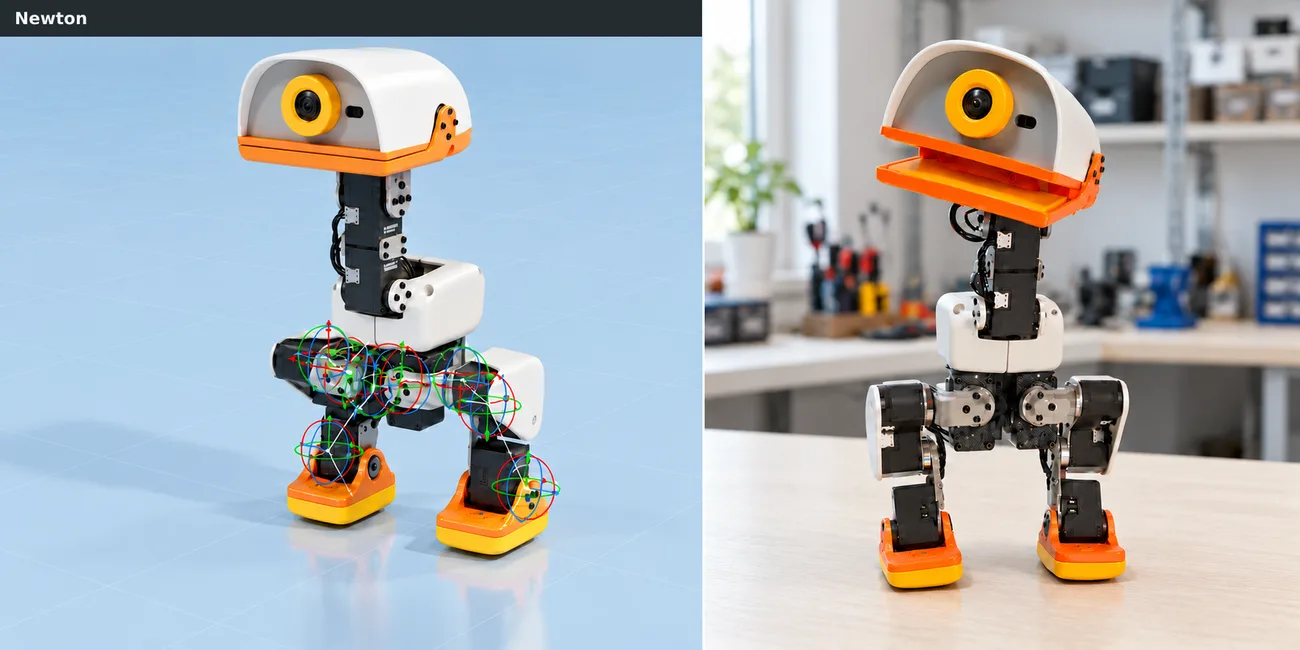
In a community guide published on the Hugging Face blog on October 21, 2026, NVIDIA contributors explained a simulation-to-real training workflow for the Pollen Robotics and Hugging Face Microduck robot using Isaac Lab 3.0 and Newton. The guide walks through simulating a walking policy on a GPU, evaluating it, and transferring it to a physical robot as an ONNX file.
What training environments are available for Microduck?
Isaac Lab includes Microduck’s robot model, scene, observation and action definitions, reward settings, and randomization options. Alongside a flat-ground walking task, it also offers a rough-terrain option covering stairs, slopes, and uneven surfaces. According to the guide, the policy uses 61 observations and outputs 14 joint positions.
The interface used in simulation must match the exported policy loaded onto the robot. In particular, the observation order, normalization, and action scaling should remain consistent with the training settings. This helps preserve the input and output structure learned by the policy during training when moving to hardware.
How do Newton and randomization affect the simulation?
The guide uses Newton’s MJWarp solver and Newton-based Better Actuator Models (BAM). This approach aims to represent servo behavior in simulation. A gear backlash setting is also used to incorporate mechanical play in the joints into the training scenario.
To prepare the policy for different physical conditions, training randomizes mass and center of mass, ground friction, joint inertias, encoder offsets, battery voltage, and command latency. Terrain conditions also vary, and the robots are subjected to pushes. These variables increase the range of conditions that may arise in simulation; for real-hardware performance, the guide emphasizes correctly transferring the source, observation, and action settings.
GPU training and transferring the policy to a robot with ONNX
Isaac Lab can run simulation environments in parallel on a GPU. The guide reports training performance of up to 1.25 million steps per second with rough terrain and gear backlash enabled. Example commands use 4,096 simulation environments; training is also described as distributable across 16 GPUs. These figures apply to the configuration in the guide and do not guarantee the same results on other hardware.
When evaluating the policy, Isaac Lab’s RSL-RL playback workflow automatically exports TorchScript and ONNX files. The ONNX file is used to transfer the policy to a real Microduck. The guide also covers copying and loading the file onto the robot, then testing controls such as standing, walking slowly, turning, and stopping.
ONNX policies can be submitted to Microduck Arena for comparison on shared tasks. The Arena accepts models with 61 observations and 14 action values, with a maximum file size of 64 MiB. The guide also describes the option to share the training configuration and model on Hugging Face Hub.
Implications for architecture and visualization workflows
The guide focuses not on architectural modeling but on robotic training and transferring a policy developed in simulation to a real robot. Rather than providing a direct architectural design or visualization function, it covers a practical training workflow for teams working in robotics and physical AI. The source also notes that future work could explore perception tasks using camera depth and different manipulation examples.
Teams evaluating the workflow should first check the hardware requirements: a Linux workstation, a supported NVIDIA GPU, and a driver are required for training. The guide describes Isaac Lab as an open-source framework, but does not provide detailed licensing terms or total costs. It is therefore important to review technical compatibility and licensing conditions separately.
Sources
1 sourceSource texts are not republished; short quotes are marked, everything else is our own summary and commentary.
The guide’s practical value lies in bringing the steps for simulating, training, exporting, and testing a walking robot on physical hardware together in one workflow. For teams working in robotics or physical AI in Turkey, the first thing to check is whether their Linux workstation meets the supported NVIDIA GPU and driver requirements.
For architecture and archviz teams, this is not a direct production tool; it is more relevant to those interested in training robot behavior in simulation. Since the source does not detail licensing terms or total costs, teams should clarify licensing conditions and hardware compatibility before drawing up a budget or production plan.
Frequently asked questions
How is an Isaac Lab policy for Microduck transferred to the robot?
The guide says Isaac Lab’s RSL-RL playback workflow generates TorchScript and ONNX files. The ONNX file is used to transfer the policy to a physical Microduck.
How many observation and action values does the Microduck walking policy use?
The policy takes 61 observations and outputs 14 joint positions. The interface must remain consistent during both training and hardware deployment.
Which models does Microduck Arena accept?
The Arena accepts ONNX models with 61 observations and 14 action values, up to 64 MiB in size.